March 2026 (26.3)
Last updated: April 8, 2026
This month's release introduces a major new feature, now available under the new Assets tab in the main navigation.
Asset Analysis
Stop hunting across tools to find coverage gaps in your clients' environments.
Asset Analysis lets you query the data from your connected integrations to surface what's missing, what's unused, and what's stale.
Run analyses across all clients or a single one to find:
Whitespace - Endpoints in RMM missing from EDR or BCDR; inboxes without Email Security or SaaS Backup; users not enrolled in MFA or Security Awareness
Zombie assets - Users in MFA or SAT that no longer exist in Email; endpoints checking into EDR or BCDR after removal from RMM
Stale agents - Assets active in RMM but not checking into connected tools
Save queries to re-run later, browse your full query history, and export any result set to CSV.
Find this feature at Assets > Analysis.
Requires integrations and client mappings to be configured.
Read more: 📄 Asset Analysis
Integrations
Mar 31: Added 📄 Hook Security
Mar 26: Added 📄 AcronisRMM
Acronis integrations use the same API credentials, if you have previously integrated Acronis BCDR or Acronis EDR, the Acronis RMM integration is automatically connected
Mar 6: Added 📄 Blackpoint Cyber - CompassOne is now available as a supported EDR integration.
New Features
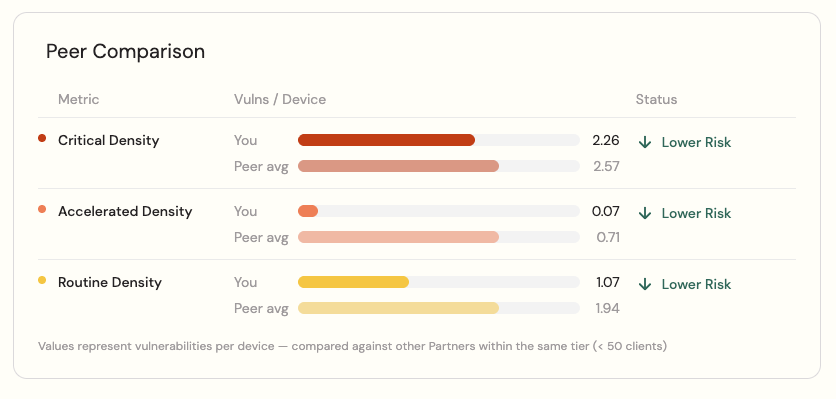
Mar 20: Added Peer Comparison for software vulnerabilities on the Risk Insights page
Improvements
Mar 20: Improved descriptions and functionality for our MCP server (📄 Cork Public API & MCP Server)
Mar 13: Expiring API keys notification takes days-till-expiration into consideration
Mar 13: The Acronis integration can now be activated and deactivated directly from Cork, which registers Cork as an integrated platform in the Acronis portal
Mar 6: Added inbox type to 📄 Cork Public API & MCP Server
Mar 6: Update new partner welcome email
Mar 5: 📄 Cork Cyber Scoreis now displayed within the compliance summary report
Mar 5: Device properties including serial number, MAC address, hostname, and IP are now accessible via the API
Bug Fixes
Mar 16: Hardened device deletion if duplicate device is no longer seen through an integration
Mar 10: Fixed issue where savings opportunity widget was not showing all devices properly
Mar 9: Fixed issue where cancel button did not work after opening the submit a support ticket popup
Mar 6: Fix UX when clicking a CVE from the software vulnerability table
Mar 3: Proofpoint user types are now resolved more accurately - silent users and organization admins are correctly identified as individual inboxes, and functional accounts as group inboxes