Cork Reaper: Automated Software Remediation
Last updated: October 21, 2026
Cork Reaper (Automated Software Remediation) allows MSPs to schedule software vulnerability remediation at their cadence of choice. Scheduling can be set up on the platform here.
Prerequisite
Some integrations require initial setup before software can be pushed out, please see: 📄 Software Deployment Automation
Most Common Questions
How often can I schedule remediation?
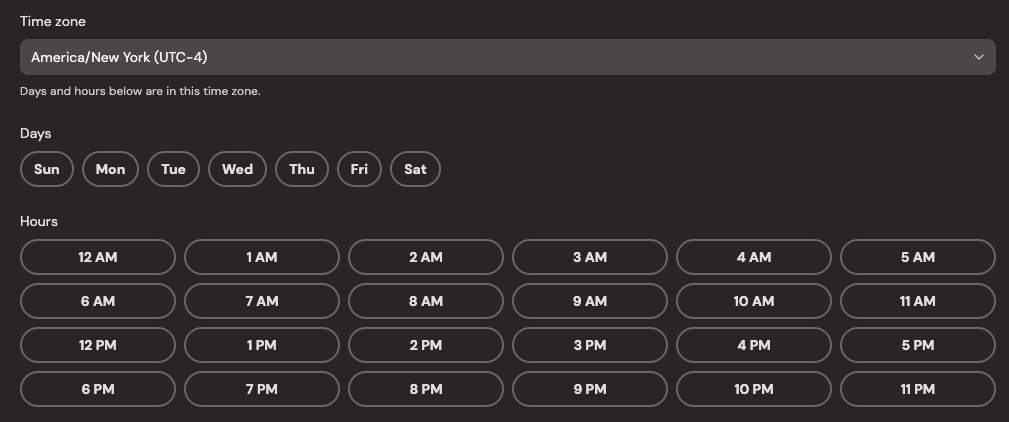
Remediation can be scheduled to run at any hour, multiple times a day, or multiple days a week.
Can I pick which software vulnerabilities I want to remediate?
Yes, you can choose either all software to be remediated or only those of your choosing.
Which software can have vulnerabilities remediated?
We utilize WinGet and Chocolatey to install software, we attempt to automap these packages to the correct software vulnerability. If our algorithm confidently matches the three parts (your software, vulnerability, and associated package), then the software can be remediated. If you expect to see a specific software available as an option (or a piece of software isn't being remediated with all software selected), please open a support ticket.
Can I remediate only critical vulnerabilities?
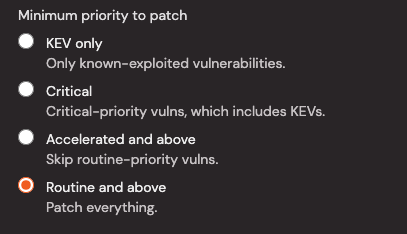
Each schedule you can choose to remediate all vulnerabilities, accelerated and above, critical, or only KEVs (known-exploited vulnerabilities).
What if an install fails on a device?
A failed install attempt on a device will be retried again on the schedule's next time slot. A successfully install attempt will silence the vulnerability for a week and clear officially once the RMM reports the software has been updated on a integration sync and vulnerabilities have been re-processed.
Can I have different schedules for different clients?
Yes, you can apply a schedule for either All Clients, Clients with Financial Protection, Eligible Clients, or an individual client. If you have a schedule for all clients and another schedule for a specific client, the specific client's schedule will take precedence.